
What are cookies and how do they work?
 A cookie or computer cookie is a small file with information that is stored in the user’s browser when visiting a website and in which the user’s settings and preferences or the status of the browsing session, such as whether or not the user is logged in, or the products that have been added to the shopping cart, are usually stored.
Lately there has been a lot of talk about cookies due to the advent of the anti-cookie law, but few people really understand what they are and how they work. Let’s see what they consist of:
The files that make up the websites travel through the networks encapsulated within packets of information using the HTTP protocol (Hypertext Transfer Protocol). This protocol is said to be stateless because it has no way of storing state between requests. Some examples of statuses can be: being logged in, if it is not the first visit to the site, having a product in the shopping cart, etc. One of the ways to maintain state and, therefore, to allow the content of the same URL to change according to the user’s actions, are cookies.
A cookie consists of a key that gives it a name and an associated value, which can be created, modified or deleted both on the client and on the server and which, once created, is sent in each HTTP request, for each file, as a parameter of this protocol. The name cookies is derived from the computer term magic cookie, which defines information that is sent and returned the same on every request.
For example, we can have a cookie whose key is “cart” with the value “12345”, which indicates that the web has to show the cart with identifier “12345”. This cart will contain the products chosen by the user for later purchase.
How do cookies work?
Cookies can be persistent or non-persistent. They are persistent, if they have an expiration time and if they do not, they are deleted when the browser is closed. Non-persistent cookies are those used to keep the user’ s session open, since the server knows from the cookie’s identifier to which user each open session belongs in memory.
In order to prevent any page from being able to recover the state that the user had on a different website, cookies are always associated with a domain and can only be created, modified or deleted if they belong to the same domain or to the top-level subdomain. For example, if we are visiting a.b.c.com code will be able to write cookies in a.b.c.com and b.c.com, but not in c.com. Another security restriction is that you can never create cookies belonging to a TLD (e.g. .com), this type of cookies are called supercookies. As an additional security measure, we can create cookies so that they can only be read from a specific URL.
Let us now look at a graphic example of what happens when cookies are created on the client and on the server:
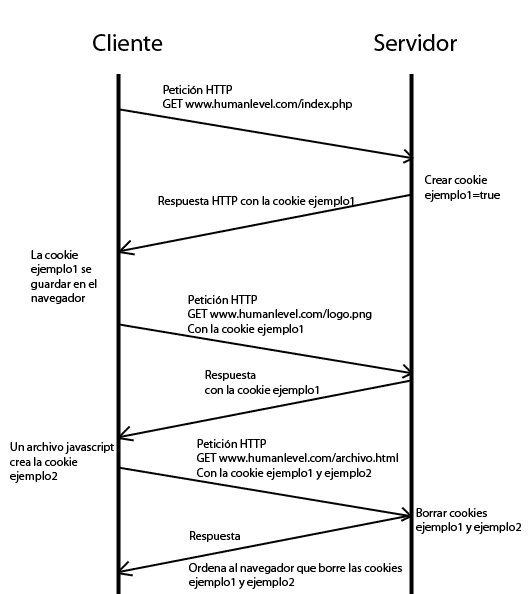
In the example above all cookies belong to the domain www.humanlevel.com, but what happens if we include in www.humanlevel.com a JavaScript that links from another domain (e.g. googleads.g.doubleclick.net)?
What happens is that when executed in the browser, the JavaScript can create, modify and read cookies from our domain, so in the example above, the external JavaScript would have access to our cookies example1 and example2 and could forward them to their servers through a AJAX cross request. That’s why, as I mentioned in another post when I talked about
XSS attacks
attacks, to improve the security of session cookies, it is recommended to always mark them as Httponly, so that they cannot be read by an external JavaScript. In addition, if we mark them as Secure and use HTTPS they will be encrypted.
However, when the script is generated on the googleads.g.doubleclick.net server, we are not on our domain, but on googleads.g.doubleclick.net and therefore can only create cookies for that domain, but they still reach our browser and are saved. This is called third-party cookies, as they are introduced when you visit our website but do not belong to our domain. In this way, if we then visit another page that use the same JavaScriptor other JavaScript from another domain of the same company that sends cross AJAX requests to googleads.g.doubleclick.net, it will be able to retrieve the googleads.g.doubleclick.net cookie from the server side. This cookie will have an identifier that will be used to retrieve the information captured from the user in order to be able to maintain status between different domains. One of the most used applications of this technique is to display advertisements of the pages we have visited.
Let’s see another graphic example of how this happens:
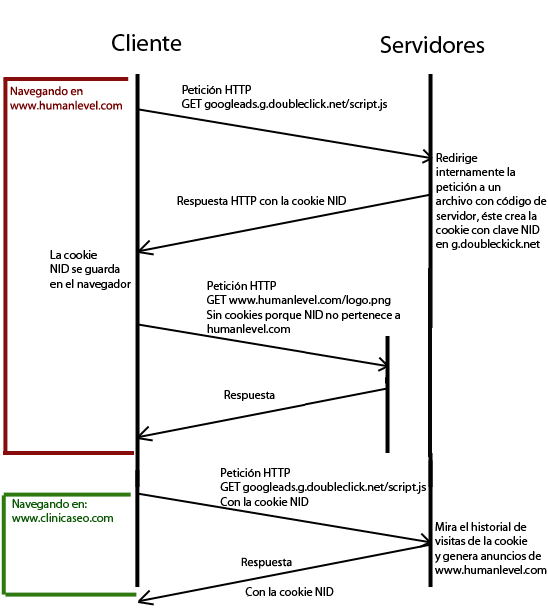
At the time of the first request, the server can read the URL from which the request comes from the HTTP_REFERER parameter of the HTTP header or, once the JavaScript is executed on the client, send this information to itself. In this way, for each website visited by the user, the Adsense server stores the history associated with the NID cookie identifier. Therefore, if the website you had previously visited had Adwords campaigns, your ads will appear on the website you are visiting at that moment.
As if all this were not already complicated enough, we also have the so-called zombie cookies, which are created again after deleting them, because some scripts regenerate them from time to time.
All this makes the implementation of the anticookies law quite complex to carry out and it is necessary to develop a specific solution for each website.
Additional references
- What are cookies – Home Office Guide.
- The future of cookie law in Europe – Álex Barbarà Artigas.
- Proposal for a REGULATION OF THE EUROPEAN PARLIAMENT AND OF THE COUNCIL on privacy and the protection of personal data in the electronic communications sector.
- What are cookies? – Human Level’s Online Marketing Dictionary.
- Does my website comply with the cookie law? – Raúl Carrión.