Tabla de contenidos
We continue to delve deeper into e-mail marketing. After having seen how to make a conversion-oriented e-mail advertisement, we now turn our attention to the
newsletters
also known as newsletter or e-newsletter.
A newsletter is a publication that is used to periodically inform about  news or to send information of interest to a group of people who have previously subscribed.
Applied to companies, we can describe it as a publication that is regularly distributed via e-mail, providing information of interest to its subscribers. By sending regular newsletters, companies ensure that their subscribers are aware of their services, it is a good way to build their loyalty.
Choosing an e-mail service
A very common mistake when you need to send mass e-mails is to do it from your own e-mail account. Each mail service provider has security measures in place to prevent any person or company from sending mail indiscriminately.
The most advisable is to use an e-mail sending service. You can start with some free solutions such as MailChimp which has a limited free version and several paid versions.
Choosing the design and features
When we talk about newsletters we can distinguish two types of content. On the one hand we will have newsletters focused on showing the latest news to the subscriber and on the other hand the newsletters with timely information, for example informing subscribers of a change in office hours or congratulate Christmas.
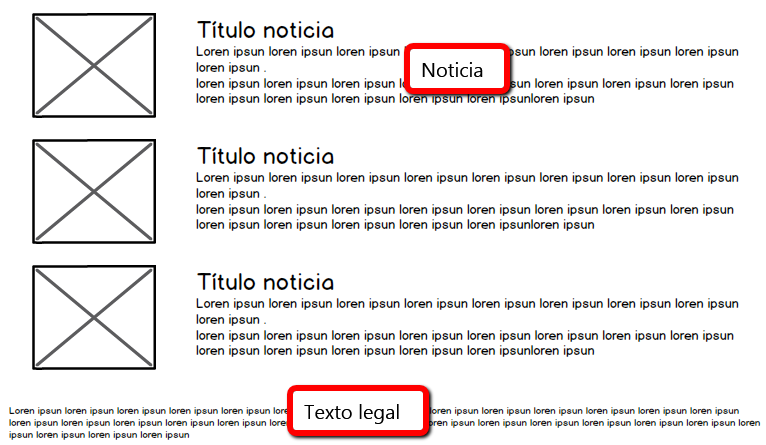
In the first one, a newsletter focused on showing the latest news will have a design in rows or columns where the title of the news and a small legend of the content will be shown. We can also accompany the news with an image.
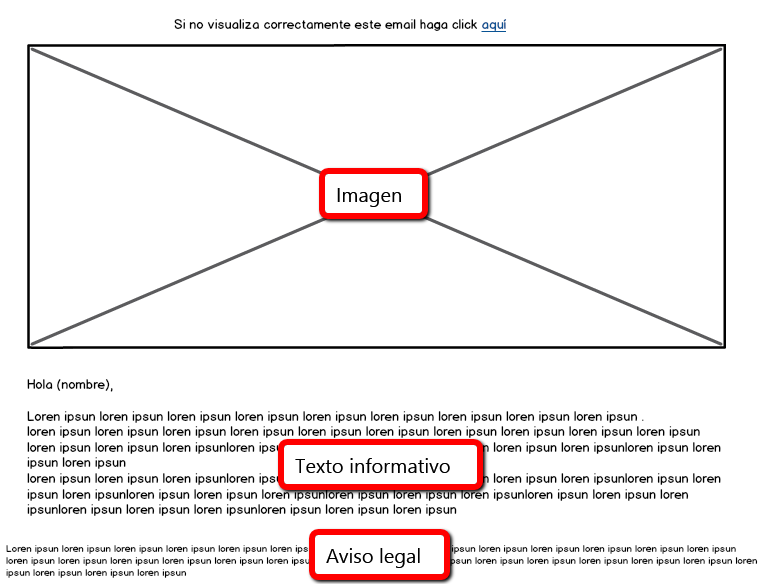
The newsletter focused on conveying specific information will have a main image and may also contain a text detailing the reason for the newsletter.
To obtain shipment tracking information we may use Google Analytics custom campaigns. It consists of adding parameters to the URLs of the e-mail links that collect information on the visits that come from the reception of the newsletter. This information is available in the Analytics reports.
Parameters are variable-value pairs that contain the information that identifies a campaign. For example, the utm_source=newsletter tag identifies that the traffic came from a newsletter, while the utm_campaign=june tag identifies that it was the June campaign. It is advisable to use transparent names and to keep track of what each of the campaign values is related to. Analytics is case sensitive, so utm_source=google and utm_source=Google are considered separate entries. All variables are case sensitive.
Custom campaign parameters
There are a total of five parameters. It is recommended to always use utm_source, utm_medium and utm_campaign for all links in the e-mail to track referral traffic. While utm_term and utm_content can be used to track additional information.
- utm_source: identifies the advertiser, site, publication, etc. that sends traffic to your property, for example: google, busquedaciudades, boletininformativo4, vallapublicitaria.
- utm_medium: the advertising or marketing medium, e.g.: cpc, banner or e-mail newsletter.
- utm_campaign: individual campaign name, slogan, promotion code, etc. of a product.
- utm_term: identifies paid search keywords. If you tag paid keyword campaigns manually, you must also useutm_term to specify the term in question.
- utm_content: used to differentiate similar content or links in the same ad. For example, if you have two interactive sentence links in the same email message, use utm_content and set different values for each to find out which version is more effective.
The newsletter should be sent to subscribers. Subscribers may be customers or future customers to whom the content of the newsletter may be of interest and useful.
We must control that the accounts to which we send the newsletter are valid so that it is not registered as spam and the mail server blocks us. For this purpose, it is advisable to filter and update the e-mail accounts in our database before each new mailing.
How to increase the number of subscribers?
There are several strategies to increase the number of subscribers from the Web site:
- Add a section for users to sign up for the newsletter.
- In the registration form include the option to subscribe to the newsletter.
- When making an online purchase, in case the customer is not subscribed, the option to subscribe can be included.
Legal obligations of e-mail marketing
It is mandatory to include in the newsletter the steps to follow to unsubscribe. From the moment the subscription is cancelled, the user should no longer receive them.
Also for security reasons, a welcome e-mail can be sent at the time of subscription to confirm your subscription. This e-mail also explains the procedure to unsubscribe.
Newsletters are definitely an economical and useful tool to create stable and lasting relationships with customers. They receive regular updates and this regular communication enhances the company’s brand image.
Newsletter vs E-mail advertising
As we have already mentioned, an advertising e-mail is focused on conversion, on capturing the subscriber’s interest in order to achieve a goal. However, the purpose of the newsletter is to keep the subscriber informed of news concerning the company. The motivation is purely informative.
We hope you find this article useful.