Tabla de contenidos
Artificial Intelligence is becoming increasingly present in our lives and in the way we search the Internet. Recently, Google has taken another step forward and integrated AI within the Google Maps ecosystem and business profiles.
Google had been giving us clues that something new related to “Questions and Answers” on business profiles was coming. As early as the fall of 2025, it announced that as of November 3, it would stop supporting the “Questions and Answers” API.
Over the past few months, the “Ask a question” option (or “Ask Maps,” as we have seen screenshots using both names) has appeared on some local business profiles located in the United States. The difference is that this time, the business doesn’t answer you—Gemini does. Although it hasn’t been officially announced by Google yet, we expect this functionality to eventually roll out in Europe sooner or later.
What is the new “Ask a question” or “Ask Maps” feature?
This new functionality directly integrates Gemini (Google’s AI) into how users interact with businesses appearing on Google Maps. For example, imagine someone wants to book a table at an Italian restaurant and has two questions:
- “Does it have an outdoor terrace? I can’t see one in the photos…”
- “Do they serve pizza carbonara? I’m really craving that dish…”
Traditionally, the user might get lost reading through a mountain of reviews left by others or searching through the endless photographs of the restaurant uploaded by the owner or other users to the profile.
With this new feature, Google allows us to ask these questions directly to the AI. Gemini will be responsible for scanning all available information about the business to provide a justified answer.
Examples of suggested questions and their answers can be seen in the following image:
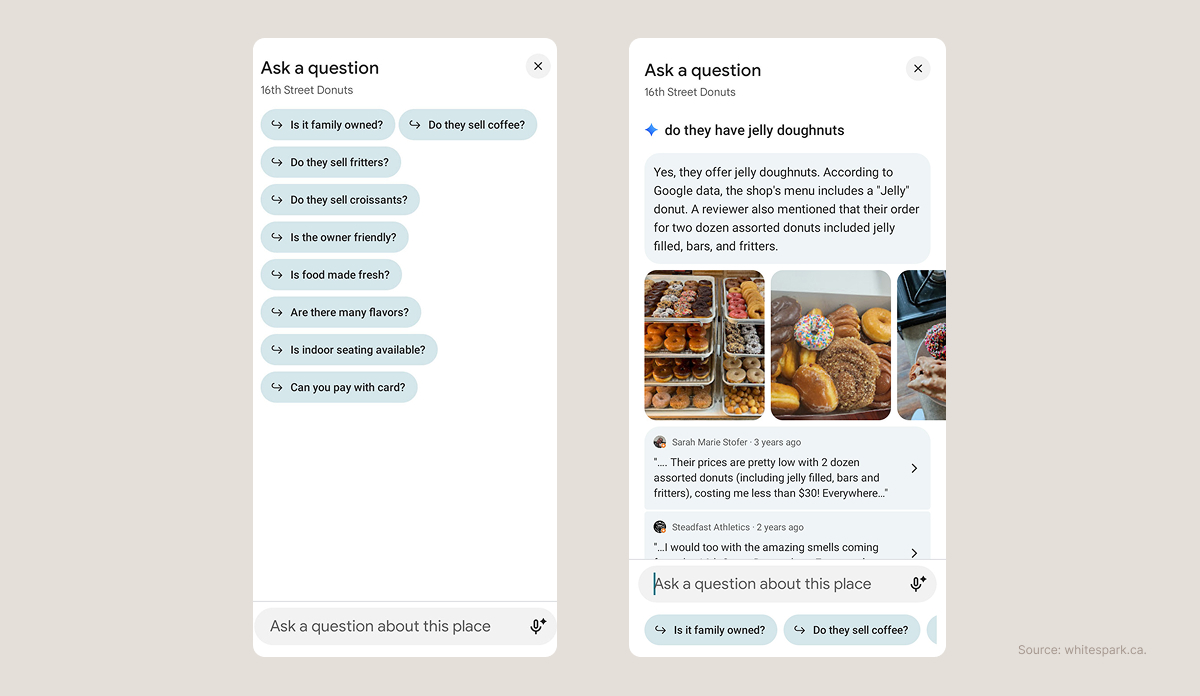
In this example, we see a user asking if they offer a specific type of product, and Gemini justifies its response by showing photographs of the product and several reviews that mention it—all extracted from the business’s Google Business Profile.
One thing to keep in mind here is the freshness of the information the algorithm uses to justify its response. We can see that the reviews are from three and two years ago, respectively, so the business may have stopped selling that product by now. While we don’t see the date of the images in the example, it is generally recommended to verify the age of the algorithm’s justifications.
This functionality is still in its very early stages and is only available for businesses in the United States (depending on the industry), so we expect improvements regarding the freshness and validity of the information.
Where will Google extract information from to answer our questions?
Gemini will draw from an extensive list of sources to compile information about a business and will periodically update its knowledge base. It is crucial that the information Google has about your business is accurate and up to date.
Do we know which sources it will consult? The good news is that we do, and we also know how to optimize them.
Basic Google Business Profile Information
Verify that basic business details are up to date and correct: business name, address, phone number, website URL, and business hours.
Categories
Ensure the business is categorized correctly and as thoroughly as possible. It is important to include all secondary categories that cover your services, but keep an eye on brand dilution…
Services and/or Products
The Services and Products section is vital for any local business. This is where we directly state which services or products users can find, making it an extremely useful section for answering questions about “what a business does or doesn’t do.”
Reviews on the Business Profile
As seen in the previous example, Gemini reads and relies on user reviews to justify its answers. Therefore, it is highly recommended to have a strategy for regularly acquiring reviews that include references to specific products, services, and features you want to highlight. If they also include supporting photos or videos, you’ve got the perfect review.
Audiovisual Material on the Profile
It is vital to showcase the facilities (both interior and exterior) in photos and videos, product inventory, menus (for hospitality), services, and results (the “before and after” approach is very common and effective for hair salons or dental clinics, for example). It is also very useful to display diplomas, awards, and certifications, as these help improve trust signals for both users and algorithms.
Reviews on Third-Party Websites and Business Directories
Getting reviews on major external platforms can be very beneficial, as Google looks at these as additional sources. In fact, some profiles already show the business’s rating on other platforms like TrustPilot, Yellow Pages, and Facebook in addition to the profile’s own score. It is also fundamental to keep our data accurate across various business directories where we are listed, as Google also crawls and extracts business information from these sites.
Attributes
The attributes section is often an undervalued gold mine. For example, if your business is a restaurant, you can specify if you have an outdoor terrace here, making that information easily accessible to the algorithm.
Links to the Business’s Social Media
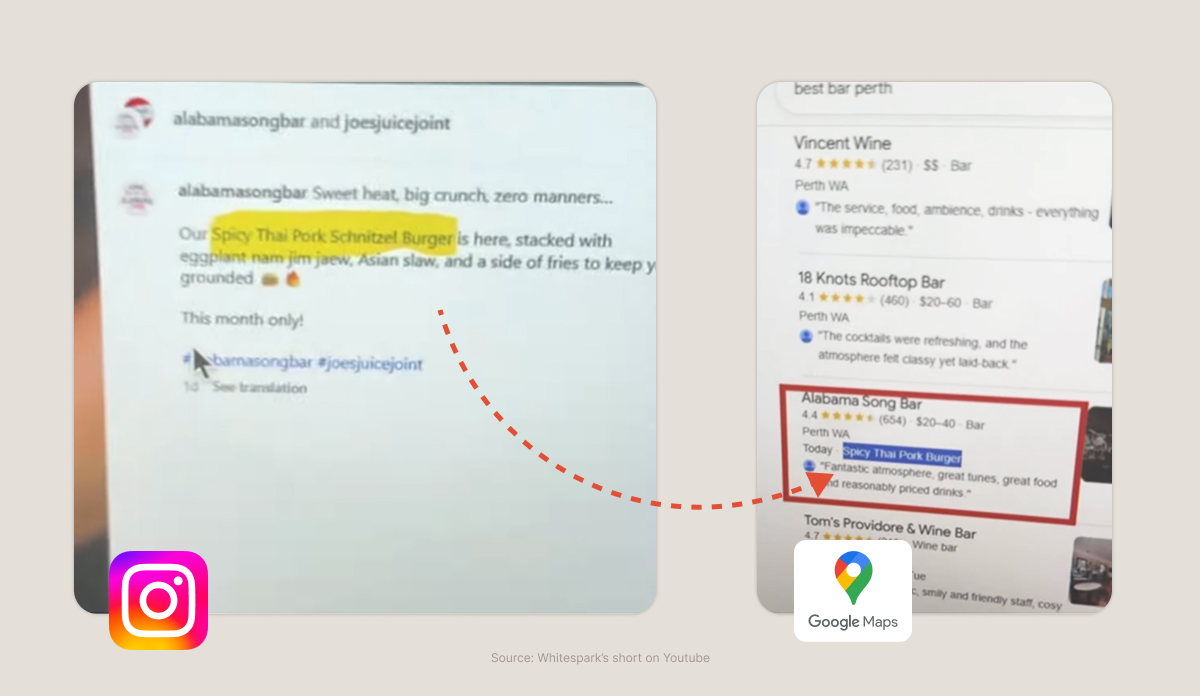
Just a few weeks ago, justifications started appearing on Business Profiles that Google extracts directly from the businesses’ social media profiles. Google understands that social media plays a crucial role in the communication strategy of local businesses.
Website Content
The information we provide on our website about our business—who we are, what we offer, and how to contact or hire us—is vital for providing Google with further context. We must verify that all important information is publicly available on our website.
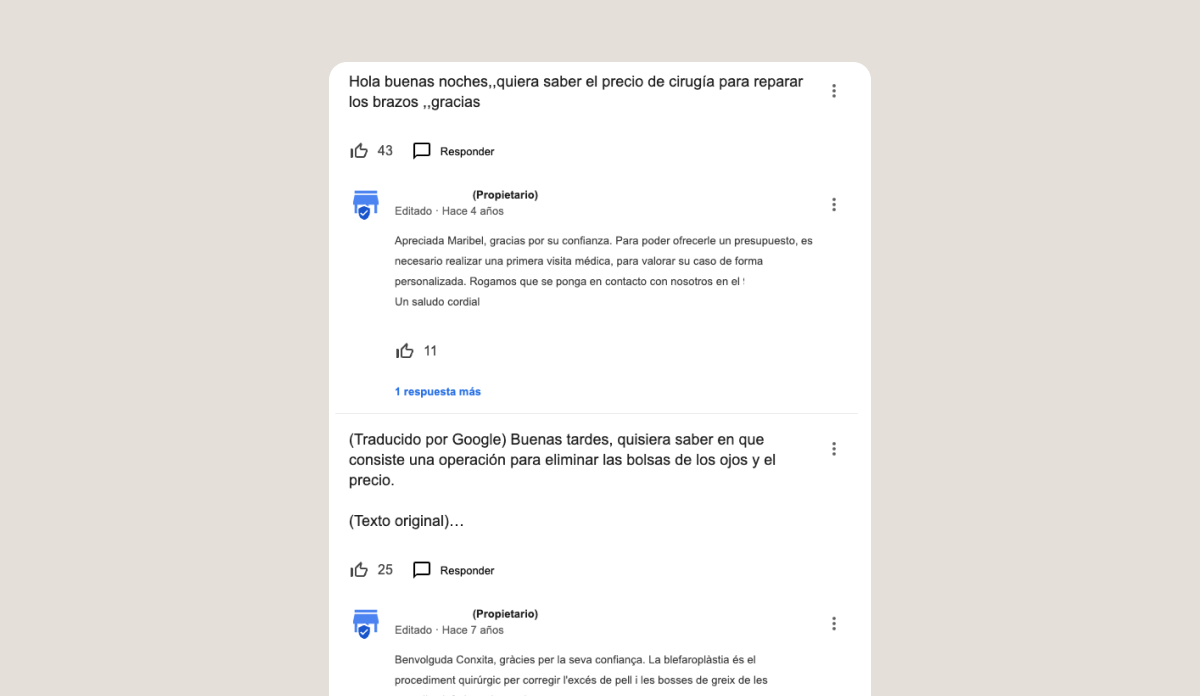
Ask a Question Aims to Replace the Old Questions and Answers Feature on Maps
As of today, Business Profiles still feature the “Questions and Answers” functionality; however, it is in the process of being replaced by the new “Ask a question” feature we have discussed.
In some cases, although the “Questions and Answers” section is still accessible from the internal Business Profile management dashboard, Google is no longer displaying it on the public business profile, meaning all the information it contains is only accessible through internal management.
This functionality could be very valuable, as the community could ask the business directly or even help each other by answering questions. However, in practice, it was rarely utilized (mostly by SEO experts).
If you want to ensure your information is complete and that the AI displays up-to-date data about your business, we can help by auditing your profile.
Main Sources Consulted
- https://whitespark.ca/blog/with-google-qa-gone-you-need-a-maps-ask-a-question-strategy/
- https://blog.google/products-and-platforms/products/maps/google-maps-generative-ai-local-guides/
- https://www.linkedin.com/posts/joyhawkins_google-is-removing-their-qa-api-in-november-activity-7376971483220381698-XNEt/
- https://www.searchenginejournal.com/ask-maps-what-it-means-for-marketers/537572/