The analysis of the server’s http/https headers makes it possible to discover suspicious redirects likely to be identified as cloaking (showing the search engine an over-optimized content, different from the one shown to users) by the search engines. They also allow you to detect other problems such as cache checks, improper programming of error pages, etc.
Tools for the analysis of server HTTP headers
If we have access to Google Search Console, we can analyze the http headers of any URL of our Web from the menu option Crawl>Explore like Google. We will get something like this:
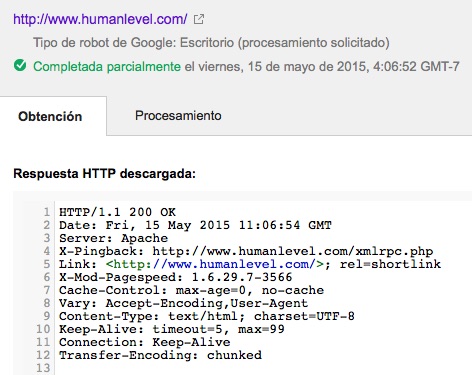
Where we can see the server response code (200 OK), as well as the rest of the server http headers.
When we do not have access to Google Search Console or for more complex situations, the analysis of the server headers can be performed using the toolbar of the Web Developer extension for Firefox. It is located in the menu Information>View Headers of the tool. However, our recommendation is to use one of the online tools available for this purpose. The reason is that Web Developer parses the server headers on request of the resource defined in the URL, i.e. of the page currently displayed by the browser. But it is unable to detect a redirect if it occurs immediately before the page request, since these redirects occur at the server level, not at the browser level. If, for example, we analyze the http headers of http://humanlevel.com/, we obtain this result:
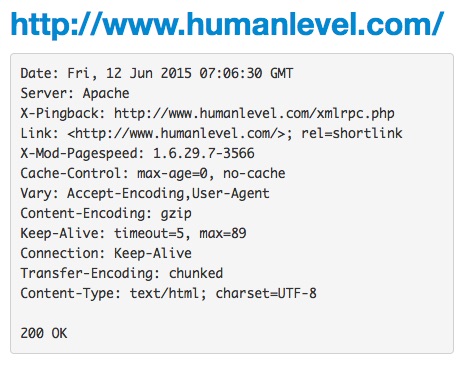
This result is not correct (or, at least, not complete), since in the analyzed URL there is a permanent 301 redirect to https://www.humanlevel.com/, which is the URL we actually use. We can see that the Web Developer plug-in does not warn us of this situation, but simply shows us the result of the analysis of the redirection destination URL.
Therefore, if we want to analyze everything that happens on a URL (including redirects), we recommend using tools such as Site Info from WMTips. If we analyze the same URL with this tool, we obtain the following result:
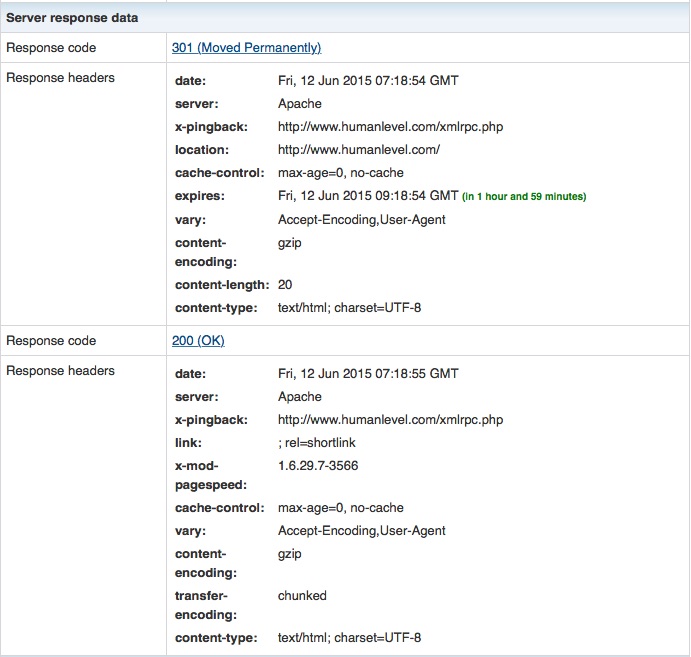
We see that this tool shows us the 301 redirection that occurs at http://humanlevel.com/, tells us where this redirect points to, and then shows us all the http headers of the second URL. Site info is able to identify and follow multiple chained redirects, so it is very useful to understand this kind of more complex situations.
Another recommended tool for an even deeper level of analysis of server headers is Live HTTP Headerswith which we can analyze the http headers returned by the server not only at the page level, but also at the level of each http request (for each image, external CSS or JS files, etc.) Very interesting, although a bit more complex to use.
Some more reference: Web Sniffer.
Relevant SEO aspects in the analysis of HTTP headers
The most relevant aspects from a search engine optimization point of view are:
- Response code. The most frequent are:
- 200 OK: resource available.
- 301: permanent redirection.
- 302: temporary redirection
- 401: unauthorized access
- 403: access prohibited.
- 404: page not found
- 410: content deleted.
- 503: server error.
- Method of requesting the resource:
- GET: request a resource from the server.
- POST: send a data to the server.
- HEAD: request only header information from the server.
- Implementation of GZip compression.
- Type of server used: PHP, Java, .NET, ColdFusion…
- Configuration of cache management.
- Type of coding used in the programming of the page:
- UTF-8: supports any type of alphabet (Latin, Cyrillic, Arabic…)
- ISO-8859-1: only supports characters from the English alphabet.
More references on HTTP headers
Quick reference to http headers
List of http headers in Wikipedia